



















































- Stock: In Stock
- Brand: TORK CRAFT
- Model: POL04-59
- Weight: 0.00kg
- Dimensions: 30.00mm x 20.00mm x 12.00mm
- SKU: POL04-59
- UPC: 6009515862251
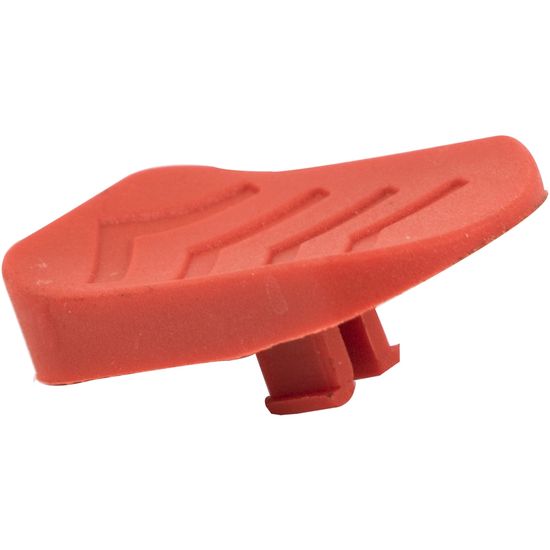
Tork Craft Polisher Push Button For POL04
At a Glance; Genuine on/off push button cap for the Tork Craft POL04 rotary polisher.
Give the controls on your Tork Craft POL04 a fresh, confident feel with this dedicated push button spare. The push button is the part you press on the outside of the handle to operate the internal switch and push rod – it is handled every time the tool is used and eventually can become worn, cracked or loose.
The POL04-59 replacement button is shaped to match the original POL04 handle design, providing a comfortable thumb or finger contact point and a clean, positive movement. Fitted together with a healthy switch and push rod, it restores the crisp start/stop action you expect from a professional rotary polisher used daily on automotive paintwork, metal and other surfaces.
Features
- Genuine Tork Craft push button for the POL04 rotary polisher.
- Matched to the original POL04 handle and switch layout.
- Correct length and profile to operate the internal push rod and switch.
- Comfortable thumb-friendly surface for easy control.
- Durable construction for regular workshop and detailing use.
- Direct replacement spare referenced as POL04-59.
Benefits
- Restores a neat, professional-looking control area on the POL04.
- Improves trigger feel for more confident starting and stopping.
- Reduces nuisance non-starts caused by worn or damaged buttons.
- Helps protect the internal switch and push rod from awkward side loads.
- Extends the working life of the polisher instead of replacing the whole tool.
Extra Information
Common signs that the push button needs replacement include a visibly cracked or missing cap, sharp or uncomfortable edges, a button that sits skew in the handle, or a control that no longer lines up neatly with the switch underneath. In some cases, the button may have been lost or damaged during a previous repair, leaving the tool difficult to operate cleanly.
The POL04-59 push button is designed specifically for the Tork Craft POL04 rotary polisher so that the contact face, travel and alignment work correctly with the POL04-58 switch push rod and POL04-45 electric switch. Using genuine matching parts keeps the whole control system feeling as it did from new.
Pro Tip
Pro Tip: When fitting a new push button, inspect the push rod and switch at the same time for wear or heat damage. With the tool unplugged, assemble the handle loosely and test the movement – you should feel a smooth, direct action and hear the switch click fully. Only once you are happy with the feel should you tighten all screws and test the polisher under no load.
Specifications
| Technical | |
| Brand | Tork Craft |
| Model No. | POL04-59 |
| Product Type | Polisher Switch Push Button |
| Compatible Tool | POL04 Rotary Polisher |
| Function | External push button operating internal switch mechanism |
| Installation Area | Handle / control area (see POL04 parts diagram) |
| Category | Spare Part / Mechanical |
Safety
- Always unplug the polisher from the mains before opening the handle or working on the switch and button area.
- Ensure the new POL04-59 button moves freely without sticking or catching on the housing.
- Do not operate the tool if the push button is missing, damaged or does not return properly.
- Refit all covers, guards and screws securely and test the polisher under no load before normal use.
- If you are unsure about disassembly or reassembly, have the work carried out by a qualified technician or an approved service centre.